Why a Full SSD Gets Slow, and Stays Slow
Filling an SSD does more than shrink its write cache. It makes garbage collection expensive, and that slowdown does not end when the copy does.
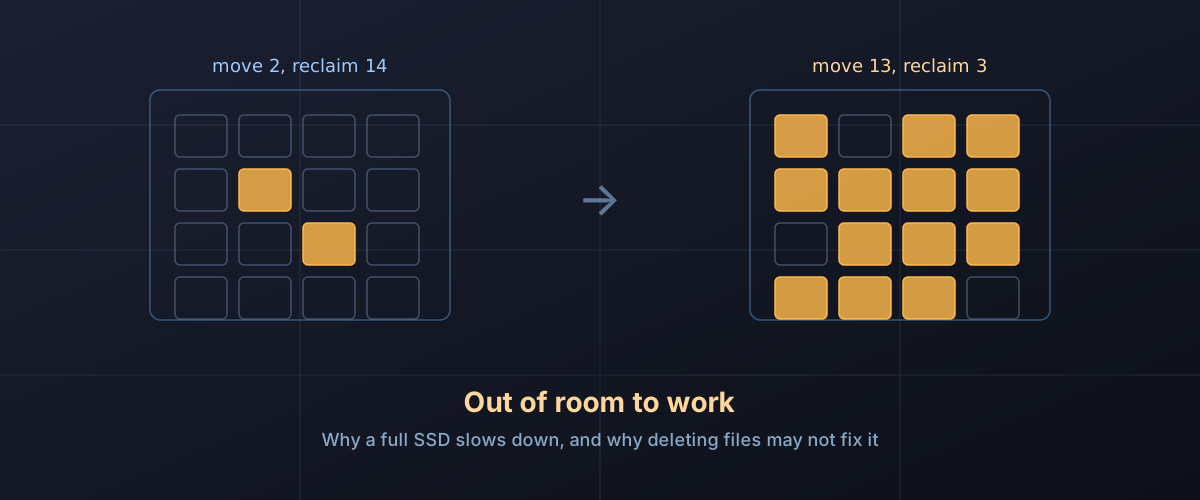
There are two ways an SSD disappoints you, and they are not the same problem.
The first is the one most people have seen: a big copy starts at full speed, then collapses partway through. That is the write cache emptying, and it ends when the copy does. The write cliff is its own subject.
The second is quieter and more annoying. A drive that felt instant when it was half empty feels sluggish at 95% full, and it stays that way. Saving a project file pauses. An installer that used to finish while you looked away now needs waiting for. Nothing recovers when you stop touching the drive, and deleting a pile of files may not fix it as quickly as you expect. This one is not the cache. It is the cost of reclaiming space, and it rises steeply as the last of the free space disappears.
Flash cannot overwrite, so it has to clean up
The root of it is a property of NAND that never goes away. Data is written in pages, but it can only be erased in much larger blocks, and a cell holding old data cannot simply be written over. Kioxia’s technical brief on garbage collection in NAND flash memory sets out the consequence: to reuse a block, the drive copies every page of still-valid data out of it, marks the rest invalid, and erases the whole block. That relocation is garbage collection, and every drive does it constantly, in the background, without telling you.
What matters is how much copying each reclaimed block costs, and that depends entirely on how mixed up the block is. Kioxia names the two extremes. A drive in what it calls Clean State has blocks whose valid and invalid pages are barely mixed, so the controller can pick a block that is nearly all garbage, move two or three pages, and get the whole block back. A drive in Dirty State has valid data smeared through every block. Kioxia is blunt about what that does to the controller’s options: in a dirty state, it writes, “it will not matter which block that the managed flash device chooses to target.”
The right-hand block is the whole article. The drive does roughly six times the copying to get back a fifth as much clean space, and it has to repeat that more often because each pass yields so little. Samsung’s over-provisioning white paper gives the ratio a name, write amplification factor, defined there as physical NAND writes divided by host writes. A rising WAF is the same slowdown seen from the endurance side, which is why free space also shows up in how long a drive’s TBW rating lasts.
Why it shows up as a stall rather than a lower number
Garbage collection is supposed to be invisible. The drive does it during idle moments, and if it keeps up, you never know. The trouble starts when it cannot keep up, because then it has to run while you are trying to write. Samsung’s white paper describes this as garbage collection interfering with the host write. Kioxia puts the reader’s experience more directly: when more data has to be moved, “incoming data to the managed flash device may need to wait longer,” and device bandwidth drops while it waits.
That is why this feels different from the cache running out. A drive past its cache still writes steadily, just slower. A drive that has run out of room to clean up writes in fits, because each burst of host data can land behind a block relocation that was not finished. Small, scattered writes are the worst case, and Samsung’s paper explains why: sequential and random write performance are the same on fresh NAND, and they only diverge once data has been written across the whole of it. Small writes leave valid and invalid pages mixed inside blocks, which is exactly the dirty state that makes every subsequent reclaim expensive.
What the free space is actually worth
Vendors hold some capacity back for this on purpose, permanently, where no filesystem can reach it. That reserve is over-provisioning, and Samsung’s own worked example is a 512GB drive carrying 112GB of it and presenting 400GB to the host. It is a separate thing from the gigabyte-counting difference that turns a 1TB label into 931GB in the file manager, and it stacks on top.
Samsung’s over-provisioning application note for its 845DC data centre drives puts numbers on the reserve. In a table Samsung labels as internal test results, a 512GB drive under sustained 4KB random writes managed 7K IOPS with no over-provisioning at all, 13K IOPS at 6.7%, and 27K IOPS at 28%, with rated lifetime rising by 2.09 times and 5.22 times over the same steps. Handing back a fifth of the capacity nearly quadrupled the sustained random write rate.
Those are 2014 data centre SATA drives under a punishing workload, not a modern NVMe drive holding a photo library, and the numbers will not transfer. The shape does. Samsung’s own conclusion in the same note is worth keeping next to the table: under a light workload in a client PC, it says users do not need to set additional over-provisioning space, and its recommendation of at least 6.7% is aimed at heavy workloads. The mechanism is real at every scale. Whether it is your bottleneck depends on whether your writes are small and scattered.
The useful insight for anyone who is not repartitioning drives is that the controller does not distinguish between space the manufacturer reserved and space you simply have not used. Both are free blocks. The catch is that the drive only counts the second kind if it has been told about it.
Deleting a file does not free a block
Deleting a file is a filesystem operation. It changes a record; it does not reach the flash. The block still holds your data, and the controller still treats it as valid and dutifully copies it during garbage collection, until the operating system sends a trim command saying those addresses no longer matter. Kioxia’s brief makes the connection explicit: unmapping in a timely manner is how a host keeps a device in clean state and minimises the relocation of data nobody needs any more.
On a modern desktop this normally just works, and the interesting cases are the ones where it does not.
- Windows. Microsoft’s fsutil
behavior
reference documents delete notification as trim or unmap, and states
it is enabled by default on NTFS unless an administrator turns it off.
Running
fsutil behavior query DisableDeleteNotifyreports the current setting per filesystem, and the reference defines 1 as disabled and 0 as enabled, so a reported 0 is the healthy answer. Worth knowing: the same page says ReFS v2 has trim disabled by default. - Scheduled retrim. The Optimize Drives task is mostly not defragmenting your SSD (Microsoft’s defrag reference says a traditional pass runs about once a month, covered in should you defragment an SSD). Microsoft’s Optimize-Volume reference lists the default operation for an SSD with TRIM support as ReTrim, which it describes as generating TRIM and Unmap hints for all currently unused sectors. That is a periodic sweep to catch anything the live notifications missed.
- macOS. Apple’s APFS FAQ states that TRIM operations are issued asynchronously from when files are deleted, after metadata changes have reached stable storage. The delay is deliberate and it is also why space you just freed may not help the drive immediately. To see whether a given drive gets trim at all, open System Information from About This Mac and look for the TRIM Support line under NVMExpress or SATA.
- USB enclosures. This is where it most often breaks. The fsutil page notes that a device which reports no trim support receives no trim notifications, and a bridge chip between the host and the drive is a common place for that support to stop. An external SSD that has been filled and emptied repeatedly without trim ever reaching it is a drive whose controller believes every block is still in use. It is one more item for the list of things to check when an external drive transfers slowly.
The numbers on the box describe a drive you no longer have
This is the part the spec sheet cannot help with, because the industry already knows about it and has a standard for it.
SNIA’s Solid State Storage Performance Test Specification opens by describing three states every NAND device passes through. Fresh Out of the Box, which it defines as the state prior to being put into service. A Transition Zone, where performance is on its way somewhere else. And Steady State, which the specification describes as representing the device’s performance during its normal working life. The document’s own summary of why the methodology exists is that a device taken fresh out of the box “experiences a brief period of elevated performance,” and the specification’s job is to make sure measurements are taken after that.
Getting there is not optional or quick. The specification defines preconditioning as writing data to the device specifically to prepare it for steady state measurement, and it sets a numerical bar for having arrived: across the measurement window, the tracked value has to stay within a 20% range and its best-fit line has to be flat to within 10%. A test operator who cannot reach that has to report it.
A benchmark run on a freshly formatted drive, which is what most of us do when a new SSD arrives, measures the elevated region the whole specification exists to skip past. The specification also requires a test’s ActiveRange to be declared, because a test that only touches part of the address space leaves the rest of the drive untouched, and that is a different measurement from one that uses all of it.
None of this means published review numbers are dishonest. It means the headline figure describes a state your drive left behind shortly after you started putting files on it.
The cache shrinks too, but that is the smaller story
Free space does feed back into the write cache, because a drive with a dynamic cache builds its pseudo-SLC buffer out of currently unused blocks. Cervoz, which makes industrial SSDs, describes dynamic SLC cache as adjusting its size according to storage usage, allocating more blocks to SLC mode when space is abundant. Less free space, smaller buffer, earlier cliff.
That effect is real, and it is covered in full in the write cliff piece. It is listed second here because it only bites during sustained transfers. The garbage collection cost bites during ordinary use, which is why a nearly full drive feels slow even when you are not copying anything large.
One more contributor on Windows, worth a line: Microsoft’s fsutil reference notes that the MFT Zone, the region NTFS reserves so its master file table can grow without fragmenting, shrinks as volume space is used. The filesystem wants room for its own bookkeeping, separately from anything the flash is doing.
So how much should you leave free?
There is no number that is true for every drive, and anyone who gives you one without asking about your workload is guessing. What the mechanism does support is a way to reason about it.
If your writes are large and sequential, a backup target, a media archive, a drive you fill once and mostly read, the dirty-state problem barely applies. Whole blocks go valid together and are invalidated together. You can run those closer to full than the folklore suggests, and the thing you will hit first is the write cache, not garbage collection.
If your writes are small, scattered and constant, a boot drive, a database, a busy virtual machine, a scratch disk for video work, this is your bottleneck long before endurance is. Samsung’s minimum of 6.7% for heavy workloads is the floor, its 845DC drives shipped with either 6.7% or 28% reserved from the factory depending on the model, and the difference between those two settings in its own test table was slightly more than double the sustained random write performance.
Two practical notes. Space you free by deleting files only counts once trim has reached the drive, so confirming trim is working is worth more than the last few percent of headroom. And if you have read that you can add over-provisioning by shrinking a partition and leaving the space unallocated, which is one of the methods Samsung names, understand that resizing a partition on a drive with data on it is not reversible if it goes wrong, and belongs after a verified backup, not before one.
The honest summary is that a nearly full SSD is not failing and is not worn out. It is a drive whose controller has run out of room to work, doing several times the internal writing to reclaim each block, during the moments you were hoping to use it.