SMR vs CMR: Why Some Hard Drives Crawl Through Long Writes
Two hard drives can match on capacity, speed and cache and still behave very differently under heavy writes. The difference is how the tracks are laid down.
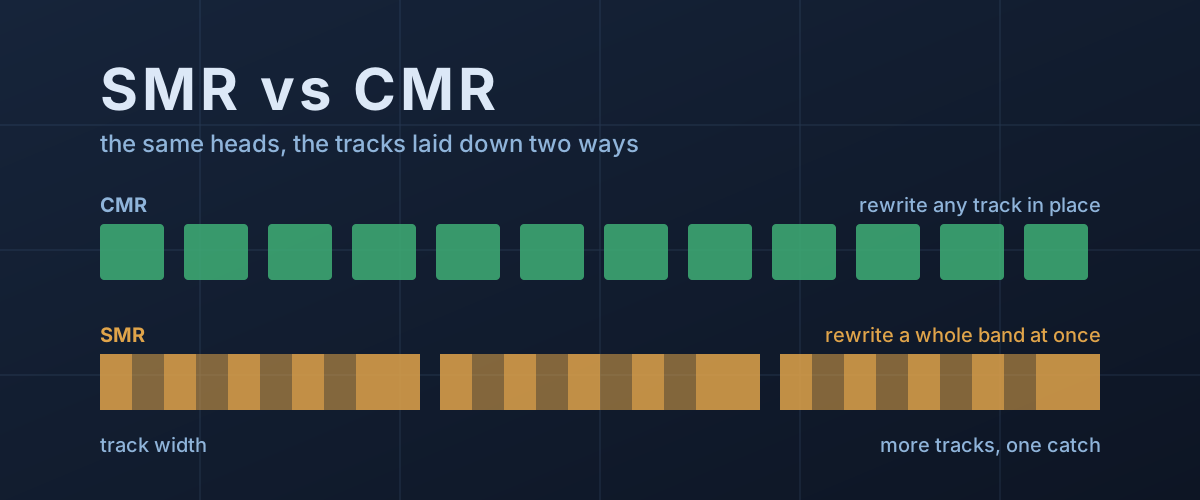
A hard drive copies the first few gigabytes of a big batch at a normal pace, then slows to a fraction of it and stays there. Or a NAS that replaced one failed disk takes days to rebuild instead of hours. Often nothing is wrong with the drive. It is doing exactly what it was designed to do, and the design is one the box rarely mentions.
Western Digital’s own WD Blue product brief lists two 6TB desktop drives side by side, the WD60EZAX and the WD60EZAZ. Same capacity, same 5,400 RPM, same 256MB cache, same 180 MB/s rated transfer rate. One row differs: “Recording Technology” reads CMR for the first and SMR for the second. That row decides how each drive handles a long write, and it is the subject here.
The writer is wider than the reader
A hard drive head has two parts. The writer lays down a magnetic track, and the reader reads it back. As Western Digital’s recording technologies brief explains, the reader is physically narrower than the writer.
Conventional magnetic recording (CMR) spaces tracks at the writer’s width plus a small guard band, so each track sits on its own strip of platter. Any sector can be overwritten in place, and nothing next to it is disturbed. That predictability is why decades of operating systems and software assume a disk behaves this way.
Shingled magnetic recording (SMR) exploits the width gap. The drive writes a track, steps the head over by only part of its width, and writes the next track partly on top of the first, like roof shingles. What survives of each track is a strip just wide enough for the narrow reader. More tracks fit on the same platter: Western Digital’s SMR white paper puts the gain for its own drives at up to 11% more areal density than a same-generation CMR drive.
Why a shingled track can’t be rewritten in place
The overlap is the whole trick, and it is also the whole problem. Because the writer is wider than what remains of each track, rewriting one track also overwrites part of the next. To change a single sector, the drive would have to read and rewrite every track after it until it reaches a gap.
So SMR drives group their tracks into bands, also called zones, with a full-width guard gap at the end of each. A band is the smallest unit the drive can rewrite. How big it is varies by drive: Western Digital’s brief describes zones of several hundred megabytes, while researchers at Northeastern University who reverse-engineered two Seagate SMR drives (more on that below) found bands of 15 to 40 MiB.
Reading is unaffected. The same Western Digital white paper says random reads on an SMR drive perform comparably to CMR. The cost is entirely on the write side.
How a drive-managed SMR disk hides this
A desktop computer expects to overwrite any sector at any time. It has no idea bands exist. Drive-managed SMR (DM-SMR), the kind sold to consumers, keeps that illusion intact with firmware that works much like an SSD’s flash translation layer, a comparison Western Digital’s own brief makes. The SSD version of this problem will look familiar.
The best public description of what that firmware does comes from Skylight, a 2015 USENIX paper by Abutalib Aghayev and Peter Desnoyers. They timed carefully controlled writes on Seagate’s 5TB and 8TB DM-SMR desktop drives, and filmed the heads through a window cut into the cover of the 5TB drive to confirm what the timings implied. What they found:
- A persistent cache. Scattered writes are logged sequentially into a reserved region at the outer edge of the platter: 20 GiB on the 5TB drive and 25 GiB on the 8TB. Because logging is sequential, the authors measured random-write throughput, with the drive’s write cache on, about 15 times that of an equivalent CMR drive while the persistent cache had room.
- Cleaning in idle time. The drive moves cached data out to its proper band by reading the band, merging the changes and rewriting it. The authors observed cleaning start after about one second of idle, taking 0.6 to 1.6 seconds of uninterrupted quiet per modified band.
- A cliff when the cache fills. Once the cache is full and there is no idle time to empty it, new writes wait on cleaning, and the authors report throughput “may degrade precipitously.”
One more finding is easy to miss. Data that was written randomly and has not yet been cleaned sits scattered through the cache, so reading it back in order behaves like a random read until cleaning catches up.
Those measurements are from two specific 2015 drives. Cache sizes, band sizes and cleaning rules are firmware decisions, and there is no industry standard for drive-managed SMR because, as Western Digital puts it, the host never sees it. Newer drives will differ in the numbers. The shape, a fast buffer in front of an expensive rewrite, is inherent to the design.
Where it hurts, and where it doesn’t
The Skylight authors summed up the conditions DM-SMR likes: writes in bursts rather than marathons, changes concentrated in a few bands at a time, and long idle periods for cleaning. That describes a desktop drive that saves documents and sits quiet most of the day. It also describes a backup or media archive written in large sequential chunks, which Seagate’s recording list names as the workloads SMR suits best.
The worst case is a RAID or NAS rebuild. When an array replaces a failed disk, it writes the missing data onto the new one continuously, for hours, while the array stays in use. There is no idle time to clean in.
Western Digital said as much in a 2020 post about its WD Red NAS drives, which confirmed that the 2TB to 6TB Red models of the time were DM-SMR. The post states that the sustained random writes of a ZFS resilver leave a DM-SMR drive no idle time for its internal data management. The same post introduced the WD Red Plus name for the CMR models. iXsystems, the company behind TrueNAS, went further in a compatibility notice: it reported that in its lab the 4TB WD40EFAX on firmware 82.00A82 could return IDNF errors under ZFS and be dropped as a failed drive, and it stopped shipping that model in its systems.
A slowdown during a heavy write is not a sign of failure on an SMR drive. If a drive is slow all the time, including reads, or is logging errors, that is a different problem worth ruling out.
How to tell which one you have
Your operating system can’t tell you. A drive-managed SMR disk presents
itself as an ordinary disk. On Linux, the kernel’s zoned attribute
reads none for both a CMR disk and a DM-SMR one, as the Zoned
Storage documentation
notes; only the data-centre variants, host-aware and host-managed SMR,
announce their bands to the system, and host-managed drives need
software written specifically for them.
The model number is what identifies it:
- Read the datasheet’s recording row. Current Western Digital product briefs, like the WD Blue one above, carry a “Recording Technology” row that states CMR or SMR for each model number.
- Check the maker’s list. Seagate publishes one covering its current families. On it, 3.5-inch BarraCuda drives are SMR at 4TB and 8TB and CMR from 12TB up, the 2.5-inch BarraCuda is SMR at 2TB and 4TB, and IronWolf and IronWolf Pro are CMR throughout.
- Match the exact model, not the capacity. The WD Blue brief shows why: at 2TB it lists one CMR model and two SMR ones, and at 3TB, 4TB and 6TB it lists one of each. A listing that says “WD Blue 6TB” without the model number could be either.
External drives are the hard case. Their makers rarely publish what mechanism is inside, and the product pages don’t carry a recording row. If long writes to an external drive slow down, the enclosure and the USB link are worth checking first, since those limits are more common, but a shingled drive inside is a plausible explanation when the first gigabytes are fast and the rest are not.
The trade-off, stated plainly
SMR is not a defect. It buys capacity from the same platters and heads, and at the top of the market it is how the largest drives get their numbers: Seagate’s list shows its largest Exos data-centre drives, at 36TB and 44TB, as SMR. For a drive that is filled once and read many times, the penalty mostly never shows up.
What the spec sheet leaves out is behaviour under sustained writes, and the rated transfer figure won’t warn you, because the WD Blue pair above carries the same 180 MB/s either way. If a drive will spend its life absorbing long streams of scattered writes, such as a NAS array that will one day rebuild, or a busy scratch disk, the recording row matters more than any number above it. If it will hold backups and media, it may not matter at all.