Do SSDs Lose Data When Unplugged? How Long an SSD Holds Data
An SSD in a drawer is slowly leaking the charge that stores your files. What the one-year figure really promises, what speeds the loss, and how to keep it safe.
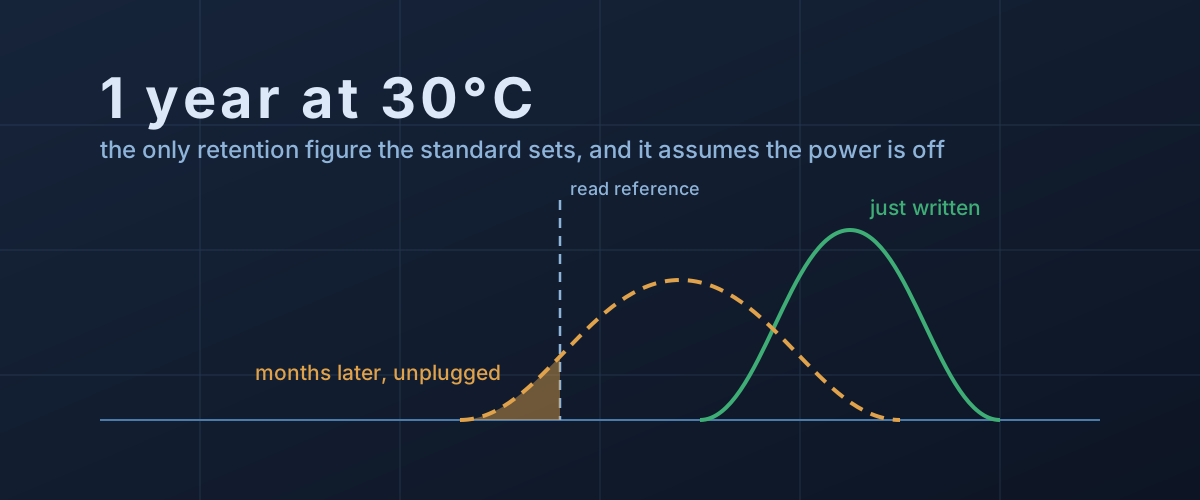
An SSD that sits in a drawer is not a sealed box. The charge that stores every bit on it is leaking, slowly, the whole time it is unplugged, and nothing inside the drive can top it up until power comes back. That is not a defect of any one product. It is how flash memory works, and it is why an SSD makes a fast working drive and a questionable archive.
How questionable depends on three things the drive’s box never mentions: how worn the flash is, how warm the drawer is, and how long it has been. The one number the industry does publish is a floor under the worst of those conditions, and it is easy to read as something else.
Where the data actually lives
A NAND flash cell stores a value as an amount of electrical charge trapped behind an insulating layer. The controller reads the cell by testing its threshold voltage, the voltage at which the cell’s transistor switches on, and comparing it with fixed reference points. A TLC cell has eight possible charge levels squeezed into the same voltage window, which is why more bits per cell means thinner margins.
The insulator is not perfect. The survey of flash errors that researchers from Carnegie Mellon, ETH Zürich and Seagate published in Proceedings of the IEEE identifies charge leakage over time as the dominant source of flash memory errors. Every program and erase cycle forces charge through the oxide and leaves some of it trapped there. That trapped charge forms paths that let electrons tunnel back out of the cell, so a worn cell leaks faster than a new one.
Their measurements on TLC chips show what the leak looks like from the controller’s side. After a day, a month and a year, the charge distribution for each level drifts and spreads. Higher-charge levels slide down the most, because the field pushing electrons out of them is strongest. Once a distribution’s tail crosses a reference point, those cells read back as the neighbouring value.
A few wrong bits are routine. Every SSD stores error-correcting code alongside the data and repairs them on every read. When a page has too many for the first attempt, the controller uses read-retry: it reads the page again with shifted reference voltages until the code can finish the job. The paper notes the cost of that, which is extra latency on every retried read. Data is lost only when a page has drifted past the point that any retry and any correction can recover.
The one-year figure, and what it assumes
The only published retention number that applies across the industry comes from JESD218, the JEDEC standard that also defines how TBW ratings work. Seagate’s paper on the JEDEC endurance standards reproduces its class table:
- Client drives (laptops and desktops): used at 40°C for 8 hours a day, then must hold their data for 1 year powered off at 30°C.
- Enterprise drives: used at 55°C around the clock, then must hold their data for 3 months powered off at 40°C.
Two conditions hide in that table, and both matter.
The first is when the clock is measured. Western Digital’s white paper on SSD endurance says a drive must meet the retention requirement throughout its rated endurance, and the standard as Seagate quotes it defines TBW that way: the writes a drive can take while still retaining data with the power off for the required time. So the year is a promise about a drive at the end of its rated life. A lightly used drive has had far fewer program-erase cycles, its oxide is in better shape, and it holds charge longer. How much longer is not published by anyone. Past the rated endurance, Western Digital says there is no longer any expectation at all.
The second is temperature. Heat speeds up the leak, and Western Digital notes the charge loss is particularly apparent at higher temperatures. The standard’s own test shows how much. Nobody waits a year to verify a year. The same table specifies a high-temperature retention stress of 96 hours at 66°C or more, or 500 hours at 52°C or more, as alternatives. Fourteen degrees of extra heat stands in for a fivefold difference in time, and the whole point of a bake measured in days is that heat compresses aging that would take far longer at room temperature. Run that logic in reverse and a drive stored in a hot garage, a car, or a loft in summer is aging its data far faster than the 30°C the figure assumes.
Most of the loss happens early
The curve is also not a straight line. A study of 3D NAND by the same research group, published in Proceedings of the ACM on Measurement and Analysis of Computing Systems, found that in their tests the retention error rate in freshly written 3D NAND rose by an order of magnitude within about three hours and by another within about eleven days, then flattened out. The authors put it down to the thinner tunnel oxide in 3D charge-trap cells and to charge diffusing along a trap layer that neighbouring cells share.
For a drive in a drawer, that shape is mildly reassuring. The steepest part of the decline is over within the first couple of weeks. What decides whether the data comes back after years is the slow tail: wear, heat and time, compounding.
Why power fixes it, and a plug-in minute doesn’t
A powered SSD is not just sitting on its data. Western Digital’s paper says most modern SSDs run background tasks that track how long it has been since each block was written and actively refresh blocks that show rising error rates or are nearing their designed retention period. The IEEE survey describes the mechanism: the controller reads the aging data, corrects it, and writes it back to a fresh block, restoring every cell to a clean charge. Controllers can schedule this at idle, trigger it when a page starts reading slowly, and run it more often when the drive is hot, estimating the faster leak with the Arrhenius equation.
All of that needs power, and none of it is instantaneous.
The clearest public example is the Samsung 840 EVO. Owners found that files left untouched for months read back far more slowly than new ones. PC Perspective’s review of the fix reports that Samsung’s revised firmware added a periodic refresh to keep old data reading at full speed, and quotes Samsung’s own caveat: the algorithm does not operate when the power is off. Slow reads of old data are what you would expect from read-retry, which rereads a troubled page until error correction can finish, and the symptom is worth recognising. If old files on any flash drive read noticeably slower than new ones, the controller is working harder to recover them. That is a reason to copy them somewhere else, and the signs of a drive in trouble are worth checking too.
How long a refresh pass takes is not something consumer drive makers publish. The most concrete vendor guidance is for servers. Dell’s support article on powered-off SSDs tells PowerEdge owners to power drives holding user data up once every 2.5 months for at least three weeks so the background tasks can complete, and to store them at no more than 40°C. Those are enterprise drives with the shorter three-month requirement, so the numbers do not transfer to a laptop SSD. The shape of the advice does: a quick plug-in to check the files are there is not the same as giving the drive time to do its maintenance.
What this means for a drive you are putting away
None of this says an SSD is unreliable in use. A drive in a machine that is switched on regularly is refreshing itself constantly. The concern is narrow: an SSD, USB stick or memory card used as the only copy of something and left unpowered for a long time. For that job, a few habits cover most of the risk.
Don’t make it the only copy. Any single drive can fail for reasons that have nothing to do with retention. An unpowered SSD adds a failure mode that grows quietly with time, so it belongs in a backup scheme with at least one other copy on a different device.
Store it cool. The standard’s own test is built on heat accelerating the leak. Room temperature in a living space is much kinder than a garage, attic or car.
Power it up, and leave it on. Connect it and leave it powered and idle for a good while, not a minute. No consumer vendor publishes a number, so err long: an afternoon is better than a coffee break, and more often than once a year is better than less.
Read everything back. Reading every file forces every page through error correction, shows you now whether anything is unreadable while another copy still exists, and on controllers that refresh slow-reading pages, prompts the rewrite. The simplest way is to keep a checksum list and verify against it. On a Mac or Linux, this creates one the first time (it only reads the drive, and writes the list to your home folder):
cd /Volumes/Archive && find . -type f -exec shasum -a 256 {} + > ~/archive.sha256and this verifies it on each later check, reporting any file that has changed or cannot be read:
cd /Volumes/Archive && shasum -c ~/archive.sha256Replace /Volumes/Archive with the drive’s own path. On Windows,
PowerShell’s Get-FileHash computes the same kind of checksum, and many backup tools
have a verify option that reads back what they wrote.
Retire worn drives from storage duty. A drive whose own health report shows most of its rated endurance used has the least retention margin left, since that year-long promise ends at the rating. An old laptop SSD that has had a hard life makes a better scratch disk than an archive.
Judging the next drive
Retention does not appear on consumer spec sheets. What you can read from the sheet is the structure behind it. The TBW rating marks where the retention promise ends, and the drive’s own percentage-used figure tells you how close to it you are. Fewer bits per cell means wider gaps between charge levels, so more drift before a bit flips. And if a spec sheet or a product page promises decades of unpowered storage from a consumer SSD, it is claiming something the governing standard does not: the only industry figure is a year, at 30°C, at end of life, and everything better than that is margin nobody has put in writing.