What the Symbols on a microSD Card Actually Guarantee
C10, U3, V30, A2 and a big number on the front. Three of those say the same thing, one is a ceiling rather than a floor, and one needs your device's permission.
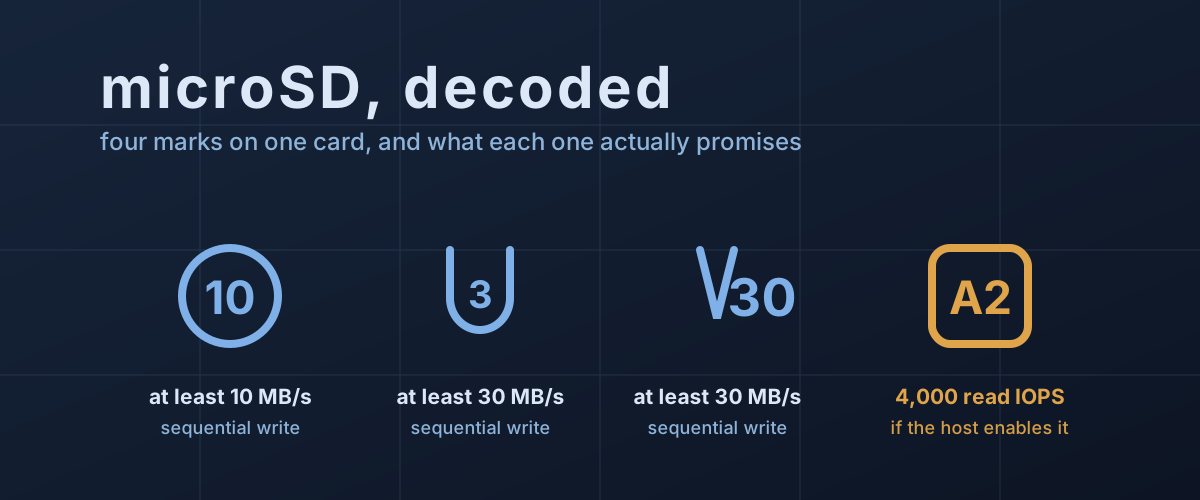
A microSD card the size of a fingernail has room on its face for about six printed marks, and manufacturers use every one. A current card might carry a circled 10, a U with a 3 in it, a V30, an A2, the word microSDXC, and, in the largest type on the package, something like “200MB/s”. None of that is marketing invention. Every symbol maps to a clause in a published specification. The problem is that the clauses measure different things, several of them measure the same thing, and the number printed largest is the only one that is not a guarantee at all.
Three of the marks are the same promise, written three times
The circled 10, the U3 and the V30 all describe a minimum sequential write speed in megabytes per second. They exist separately because the SD Association added a new notation each time the bus got faster, and kept the old ones for compatibility.
The SD Physical Layer Simplified Specification, which the SD Association publishes free, sets all three out. Speed Class 2, 4, 6 and 10 mean 2, 4, 6 and 10 MB/s or better. UHS Speed Grade 1 means 10 MB/s and above, Grade 3 means 30 MB/s and above. Video Speed Class 6, 10, 30, 60 and 90 mean 6, 10, 30, 60 and 90 MB/s of sustained write, and the specification spells out that a card claiming one class must support every class below it.
So a card stamped Class 10, U3 and V30 is telling you one fact three times: it will sustain at least 30 MB/s while writing sequentially. The C10 and the U3 are carried along because older cameras look for them. Once V30 is present, they add nothing.
That is a floor, and it is a floor for one specific workload: writing a large file end to end, the way a camera writes video. It is not a statement about reading. It is not a statement about small scattered writes. It is the number a camcorder needs, and much less informative about anything else.
The bus underneath sets a ceiling nothing can exceed
The class marks describe what the flash can keep up with. The interface decides whether that ever reaches your device.
The specification’s table of bus speed modes is short and worth knowing. On UHS-I, the fastest defined mode is SDR104 at 104 MB/s. Below it, SDR50 and DDR50 both cap at 50 MB/s. UHS-II, which uses a second row of contacts on the back of the card, defines 156, 312 and 624 MB/s modes.
Put the video speed classes against those ceilings and the reason V60 and V90 cards cost what they do becomes arithmetic rather than branding.
This is also where the big number on the front comes from. Samsung’s PRO Ultimate datasheet advertises up to 200 MB/s sequential read from a card it describes, in the same table, as UHS-I. Its bus mode row resolves the apparent contradiction: “UHS-I SDR104 / UHS-I DDR200 with Samsung microSD Reader”. A footnote puts SDR104 at up to 104 MB/s and DDR200 at up to 200 MB/s.
DDR200 does not appear anywhere in the SD Physical Layer specification. It is a vendor mode that squeezes roughly double SDR104 out of the same UHS-I contacts, and it only engages when the reader on the other end implements it. Samsung’s datasheet is unusually direct about the consequence, giving the card’s reader compatibility explicitly: reader version 3.0 reaches the 200 MB/s figure, version 2.0 reaches 180. Drop the same card into a laptop slot or a phone and the ceiling is whatever that host supports, most often SDR104 or DDR50.
A class mark is a floor the card promises. The headline figure is a ceiling that two devices have to agree on.
A2 is the only mark about the work a computer actually does
Running an operating system, launching apps, loading game assets: none of that is sequential. It is thousands of small reads from scattered addresses, and sequential throughput predicts it poorly. That is the gap the Application Performance Class was added to fill, and it is the only mark on the card that speaks to it.
The specification defines A1 as a minimum of 1,500 random read IOPS and 500 random write IOPS, alongside 10 MB/s of sustained sequential write. A2 raises that to 4,000 read and 2,000 write. IOPS here means 4KB operations completed per second.
A2 also carries a condition that A1 does not, and it is the single most consequential sentence on the subject. A2 performance is defined with Command Queue and Cache enabled. Command queueing lets the host hand the card a batch of outstanding requests instead of waiting for each one to finish, which is what makes scattered reads overlap rather than queue up. Then the specification adds this: an A2 card must also meet Application Performance Class 1 under the condition of Command Queue and Cache being disabled.
Read that as a buyer. In a host that does not turn those features on, an A2 card is contractually an A1 card. The SD Association says the same thing in plainer words on its Application Performance Class page: A2 performance is available only from the combination of an A2 card and an A2 host. Samsung’s own datasheet footnote ends “Performances may vary by host device.”
What that gap looks like on real hardware
Raspberry Pi publishes a product brief for its own cards that quotes the same card twice, once per host, which makes the point cleanly. The card is rated C10, U3, V30, A2. On a Raspberry Pi 4 running the DDR50 bus mode, Raspberry Pi quotes 3,200 random 4KB read IOPS and 1,200 write. On a Raspberry Pi 5 running SDR104, it quotes 5,000 read and 2,000 write, and names command queueing as part of what closes the gap.
Note where the Pi 4 write figure lands: 1,200 IOPS, against an A2 minimum of 2,000. The card is not underperforming its rating. The rating was never a promise about that host.
The older half of the story is worth knowing too. In 2019, Jeff Geerling published benchmark results for A1 and A2 cards on Raspberry Pi hardware and found the A2 cards delivered no random I/O advantage at all, attributing it to the absence of host support for the very features A2 is defined around. Buyers paying the A2 premium at the time were buying a capability their hardware could not switch on. Five years later Raspberry Pi ships silicon that can, and quotes the difference in its own datasheet.
Two things the marks quietly leave out
It is measured in a 256MB window. The specification’s preconditioning procedure erases the card, writes 75% of it sequentially, then designates a 256MB region as the Random Performance Test Unit. Random reads during the measurement target addresses generated within that 256MB range. A card that holds 4,000 IOPS across a quarter-gigabyte working set is not promising the same across 512GB, and a controller with a small mapping cache behaves very differently once the working set outgrows it. This is the same shape of problem as an SSD’s sustained write cliff: a headline figure measured in the regime where the hardware is at its best.
It says nothing about endurance. Class marks and IOPS describe speed, not life expectancy. Samsung’s PRO Ultimate datasheet carries a warranty clause worth reading before buying a card for a dashcam or a security camera: the warranty does not extend to continuous recording instruments, naming dashboard cameras, security cameras, surveillance systems and continuous data logging among the excluded uses. Cards sold specifically for those jobs are usually marked as high-endurance parts and priced accordingly. The speed symbols will not tell you which is which.
Reading a card for the job in front of you
The useful question is not which card is fastest but which mark corresponds to the work you are about to do.
For video, the Video Speed Class is the number that matters, and it has to clear your camera’s bitrate with margin. Check the bus tier at the same time: if the camera wants V60 or V90, it wants a UHS-II card, and a UHS-I card cannot get there no matter what its class mark says.
For a handheld, a phone, a single-board computer or anything running software off the card, A2 is the mark to look for, but only after checking whether the device enables command queueing. If it does not, A1 and A2 cards carry the same guarantee, and the A1 card is the one you are actually being sold.
For bulk transfer, the headline MB/s figure governs, and it is worth finding out which bus mode the number assumes. A 200 MB/s UHS-I card reaching that figure through a vendor mode is a 104 MB/s card in most slots, which is still quick, just not what the box says.
And check the capacity you are actually buying. Samsung’s EVO Plus datasheet lists the 64GB and 128GB models as V10, U1 and A1, while the 256GB and larger models in the same line are V30, U3 and A2. Same product name, same box design, same “up to 160MB/s” on the front, three different class marks depending on how much you bought. Within a single line, the smallest capacities are frequently the slowest, and the class marks are where that shows up. The product name does not.